How I reorganized all my repos with AI (and fixed my GitHub profiles in the process)

For years I kept collecting side projects like it was nothing.
One day you create a repo for a quick idea, another for an experiment, another for a proof of concept you will “clean up later”… and before you notice, you have repositories spread across multiple folders, duplicated remotes, origins pointing to old organizations, and a GitHub profile that does not reflect what you actually do today.
And if, like me, you also have two GitHub identities (a personal one and a professional one), then the confusion doubles.
In this post I want to walk you through the full process I followed to:
- Centralize everything locally.
- Decide which repos still make sense.
- Split repos between my personal profile (antoniolg) and my company org (devexpert-io).
- Migrate repos and update
originsafely. - Keep only active projects on disk and leave the rest in GitHub.
- And finally, make both GitHub profiles look coherent again.
But more than anything, I want you to take away the approach. The goal is not to copy my exact repo list, but to copy a method that you can apply to yours.
The real problem was not code
When we talk about AI for developers, the conversation usually revolves around “it writes code”.
In this story, the most valuable part was not using AI to generate code.
The valuable part was using it as an assistant for a risky, messy, operational task:
- Lots of scattered information.
- Manual decisions (keep, archive, migrate…).
- Real risk of deleting something important.
- And that familiar “I do not even know where to start” feeling.
AI became my obsessive PM and operations assistant: it helped me do the inventory, detect inconsistencies, propose a plan, and keep track of decisions without losing my mind.
The goal (very concrete)
Before touching anything, I set a simple, measurable goal:
- Centralize everything under
/Users/antonio/Projects. - Review what no longer makes sense (archive first, delete only when safe).
- Move repos between owners and update
originaccordingly. - Update both GitHub profiles so they actually reflect what is active.
- Keep only what I am actively using on disk.
The key constraint was: do not lose anything important.
So the process had to be incremental, with checkpoints, and one golden rule:
Never delete blindly. Inventory first, decisions second, execution last.
Step 1: local inventory (before having opinions)
First I had to answer a deceptively simple question:
How many repos do I have, and where are they?
In my case they were spread across several folders (e.g. AndroidStudioProjects, IdeaProjects, etc.). AI helped me scan them and build an inventory with signals that matter, per repo:
- Does it have an
originremote? - Which owner does it point to (personal, org, third parties, old orgs…)?
- Is it dirty (uncommitted changes)?
- Is it ahead/behind vs the remote?
- Does it have stashes?
The results were… humbling:
- 106 local repos
- 16 without
origin(local-only) - 56 with local changes (dirty)
- Some with commits not pushed
- And several pointing to owners outside my two GitHub profiles
That inventory alone changes your mindset: it stops being “a vague feeling of chaos” and turns into a finite list of problems you can actually solve.
Step 2: remote inventory (both profiles)
Next I did the same, but in GitHub.
For this I used the GitHub CLI (gh), because it is the fastest way to list repos and extract metadata without fighting the UI.
The question here was:
Which repos exist in antoniolg and in devexpert-io, and which ones have no local equivalent?
My remote inventory was:
antoniolg: 98 reposdevexpert-io: 48 repos
And the important part came after: crossing remote data with local data.
Step 3: reconciliation (crossing data to find “issues”)
This is where AI shines, because it is a perfect task for it:
- Lots of data.
- Clear rules.
- A tabular output that helps you make decisions.
When you reconcile both worlds, you can quickly detect things like:
- Local-only repos (no
origin). - Local repos whose
originpoints to a third party. - Repos that should exist remotely but are missing.
- Repos that exist remotely but are not on disk (and decide whether to clone them or ignore them).
One of the most useful outputs was turning this into “actionable lists” (“no origin”, “other owner”, “missing remote”, etc.) so I could review repos by batches instead of wandering randomly.
Step 4: the decision workflow (please do not build a web app for this)
At some point I wondered: should I build a small web tool to make this easier?
And the answer was: no.
For this kind of task, the most effective setup is surprisingly simple:
- A structured inventory (TSV/CSV).
- A decision workflow.
- And a log of what you decided, so you do not repeat steps.
AI suggested setting up “decision sheets” where, repo by repo, we would write down:
- Action (keep, archive, migrate, delete locally…).
- Destination (personal vs org).
- Notes (what it is, why it stays, what it depends on…).
That little bit of structure avoids the classic failure mode:
“I think I already migrated this… wait, no, it was the other one…”
Step 5: simple rules for a messy reality
Even though many decisions were manual, a few rules simplified everything.
For example, I had old repos pointing to an organization name I had already changed. The rule was:
- Everything under
DevExperto/*should live underdevexpert-io/*.
That does not mean you do it blindly, but it does give you a clear direction, and AI can help you detect and group all the cases.
Step 6: execution (move, migrate, clean)
This is where you must be careful: the goal is not to be fast, it is to be safe.
My local end state was simple: everything under /Users/antonio/Projects.
And my operational end state looked like this:
- Keep only active repos on disk.
- Ensure everything important is in a remote.
- Migrate repos to the right owner (personal vs org).
- Update
originso the repo “knows” where it lives.
In the end, the result was:
- 12 active repos under
devexpert-io - 18 active repos under
antoniolg
Everything else ended up archived, removed locally, or kept as historical, depending on the case.
Step 7: GitHub profiles (the part people actually see)
Here is the uncomfortable truth:
You can have perfectly organized repos and still have a GitHub profile that looks abandoned.
So once the repo landscape was under control, I moved to what is visible.
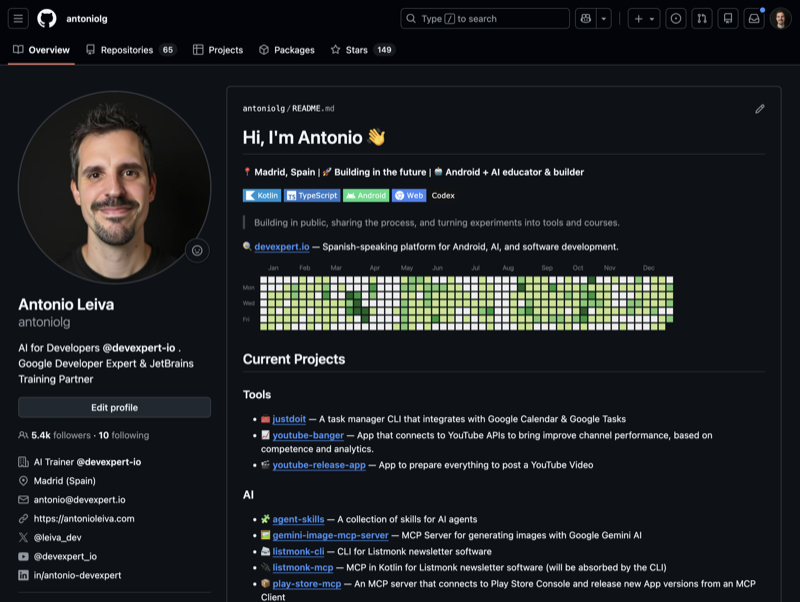
Personal profile (antoniolg)
The goal was to make it reflect what I do today:
- Current projects.
- “Connect” links as badges (cleaner than a raw list of links).
- A bit of context (e.g. a “Milestones” section).
- A small callout to devexpert.io.
- GitHub activity in a sensible place.
- A few “entry points” (recent posts, talks) so someone landing on the profile can quickly understand what I am up to.
If you are curious, GitHub profiles can have a repo-backed README. Mine lives here: antoniolg/antoniolg.
Organization profile (devexpert-io)
Here is a fun detail: the organization did not even have a profile repository.
So we started with the basics:
- Create
devexpert-io/.github - Add
profile/README.md - List featured repos (excluding private ones)
- Add “human” names and descriptions
- Add social badges
- Make sure the logo looks good in dark mode
- Add extra sections (latest posts, talks, “about Antonio” so people know who is behind it)
And then iterate.
The goal was not a “perfect README”. The goal was to make it alive: something you can update in 10 minutes when your focus changes.
A screenshot (so you can picture it)
This is how my personal profile looked after this iteration:
The key idea: AI as an assistant, not just a code generator
If you take one thing from this post, make it this:
AI is not only for writing functions or refactoring.
It is incredibly useful as an assistant for:
- Organizing information.
- Building inventories.
- Detecting inconsistencies.
- Proposing an action plan.
- Turning “a big thing” into small, sequential steps.
- Keeping a decision log.
And that is gold in day-to-day work.
Because most tasks that block us are not hard technically. They are hard because they are big, scattered, and mentally heavy.
If you want to do this yourself (without suffering)
If you are thinking about doing something similar, my recommendation is:
- Inventory local and remote.
- Reconcile both worlds and extract actionable lists.
- Decide calmly (archive before deleting).
- Execute with checkpoints.
- Update your GitHub profiles so they tell your current story.
If you are in that “I really need to clean this up” phase, do yourself a favor: do not do it blindly. Use AI as your assistant.