LLM Duel: Gemini 3 Flash vs Opus 4.5 vs GPT-5.2-Codex vs GLM-4.7

Why not pour me another LLM?
The madness of models in the last few weeks, all claiming in benchmarks that they beat the previous one, I must admit has made me feel a bit of curiosity and anxiety in equal parts.
But can we really trust benchmarks these days? Personally, I don’t think so.
First, because benchmarks are always very specific scenarios that don’t reflect the real use we’re going to give a model. And second, because each of us adapts better to some models than to others depending on how we work.
So I decided to do a small duel between the four models that have made the most noise in the last few weeks: Gemini 3 Flash, Opus 4.5, GPT-5.2-Codex, and GLM-4.7.
The test bed
For several months now, I’ve been working on an app that helps me manage my social media.
I don’t know if it will ever see the light of day, because I’m tailoring it a lot to my needs, but I’m very proud of the result.
One very specific case I have is that I post on social networks in different languages, and the app lets me define which language I post in for each social profile.
Something I also added recently is the ability to generate a post from a link, extracting the main image, and putting the link in the first comment (to avoid algorithm penalties).
I also have a wonderful AI image generator where you can define your own avatar to include yourself in the images, and I even recently added the possibility of “translating images”.
Very cool overall, and it lets me put into practice many things that I later tell my students in AI Expert.
The challenge
A few days ago another model was released, Qwen Image Layered, which can separate an image into layers.
This is extremely useful for making YouTube thumbnails:
- You create one or more images with Nano Banana Pro
- You separate the layers with Qwen Image Layered
- You keep what you want, adjust the size, add extra elements
- If you want, you even give it a final touch with Nano Banana Pro
The thing is I had been wanting to build an image editor to help me with YouTube thumbnails, and this model gave me the push I was missing.
So I thought it was a perfect use case to test the four models.
The instructions
My idea wasn’t just to test if the model generated the code, but how it planned the task and how much it researched before starting to work.
That’s why I gave it the following instructions:
I want to add a new feature: an image editor, which will be on a new page
inside this app. The idea is to leverage all the existing image generation
functionality, but add several points:
    1. Ability to add new elements uploaded from the computer
    2. Work with layers. For that we will use the qwen-image-layered model from
    fal.ai, which decomposes the image generated by the image generation model
    into layers. Here is the documentation: <omitted for brevity>
    3. A chat where you can ask for changes to the image
    4. The layer decomposition won’t happen until the user is happy with the
    image and presses a button

Ask me any questions you have before starting.
The secret was in this last sentence:
Ask me any questions you have before starting.
I wanted to make sure they asked everything necessary before getting to work.
The models
Opus 4.5 is for almost everyone the model to beat. But personally I have had very good experience with the Codex family, and this GPT-5.2-Codex in particular is delighting me.
But a few days ago Google announced Gemini 3 Flash, and some benchmarks said it was the best model of all.
Finally, just yesterday GLM-4.7 was announced, which also looked very promising.
So these four models were the ones I used for the duel.
The winner? Keep reading.
Gemini 3 Flash
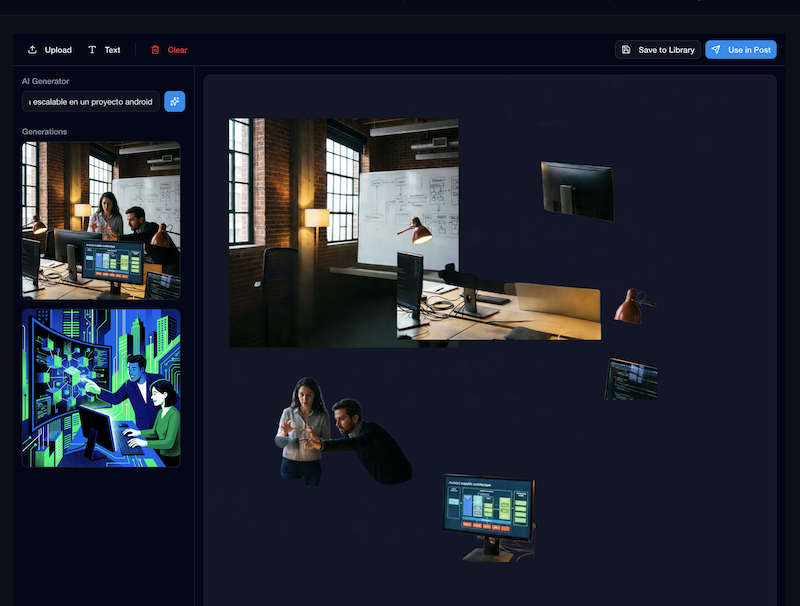
Gemini 3 Flash is probably the most surprising model of this year.
Super cheap, super fast, and with capabilities that in some benchmarks surpass the Pro model.
Does that make sense? It doesn’t seem so, but apparently Google used reinforcement learning strategies that they didn’t have time to implement in the Pro version. And it shows.
Since 2.5 Pro, I’ve always used Gemini for everything except programming. And with 3 Flash it’s the first time I trust such a fast model. I always worry that by using the “bad” model the results won’t be good enough. But with 3 Flash I don’t feel that.
For programming? My tests have been erratic. It’s extremely fast and capable of generating a lot of code at once.
But it suffers from what many models of this type do: it’s very impatient. It wants to generate the code as soon as possible, and many times it takes shortcuts that end up being expensive.
To work with this model, I used Gemini-CLI.
In this case, the questions it asked me were pretty basic, and it didn’t extract much information. At that moment I brought up that I’d like to integrate it with the post composer, being able to save the generated images for later reuse from the Composer. Something I forgot to mention with the others.
The result?
-
Interface: 3/5 -> A basic UI, nothing fancy, but functional.
-
Functionality: 3/5 -> It delivered what I asked for, but nothing more. It was far from being an editor ready to ship.
-
Robustness: 2/5 -> Most features didn’t work as expected. The editor didn’t align layers well, the space was huge, and it wasn’t clear where the design started and ended.
-
Proactivity and Planning: 2/5 -> It didn’t ask many questions and just jumped into generating code. You could tell it wanted to finish fast.
TOTAL: 10/20
One thing it did very well was integrating with the composer, which the others didn’t do. Either because I didn’t ask, or because they weren’t able to. I’ll tell you later.
That said, it was by far the fastest of all. What it does for the time it takes is impressive.
GPT-5.2-Codex High
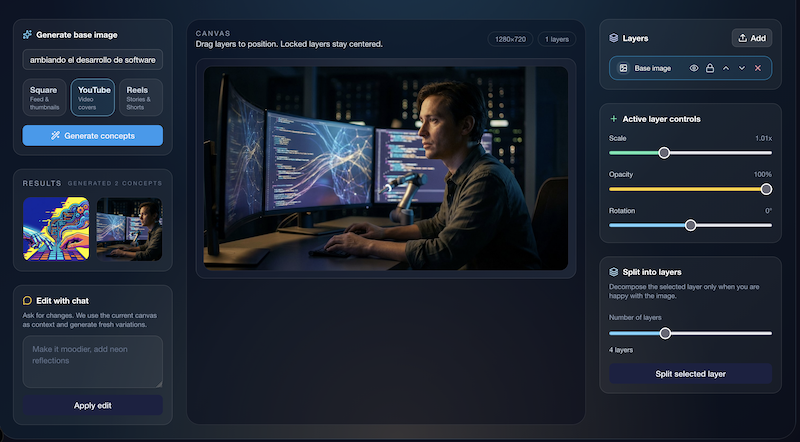
I won’t deny my weakness for Codex models. They’re my day-to-day for programming, and the results I get are always very good.
Last week I published a video about GPT-5.2, but that same day the Codex version came out, trained and optimized to work with the OpenAI CLI. And it shows.
I used Codex-CLI, and High as the reasoning level.
The questions were more precise. In this case I can share them with you:
• Perfect. Before touching code I need to clarify a few points:

  - Route and navigation: where do you want the new editor page (URL and which menu/CTA
    accesses it)?
  - Exact flow: is the initial image generation the same as what already exists today (same
    model/endpoint) and then you enter the editor, or does the editor include generation inside
    the same screen?
  - Change chat: what model/endpoint is used to apply changes from the chat (the same existing
    generation or a new one)? And should the chat keep history per session?
  - Uploads from computer: is it to add new layers/elements on top of the image (stickers)
    or to replace the base image? What formats and max size?
  - Layers: when we use qwen-image-layered, how do you want to show layers (list with
    visibility/order, thumbnails, etc.)? Can they be reordered, hidden, or combined?
  - “Don’t decompose until the user is happy”: what exactly does “happy” mean?
    Only when pressing a “Separate into layers” button or is there another criterion?
  - Persistence: should we save the editor state in DB (project/image, layers, chat) or
    can it be only client state?
  - Specs: are there specs in specs/ that we should update or create new ones? Do you want me to
    prepare a spec/plan before implementing?

  When you confirm this, I’ll start. Also, since it’s a new UI, I’ll use DevTools MCP
  to check console and behavior.
The result literally left me with my mouth open. More than a new feature, it felt like a product on its own.
For better and for worse.
- Interface: 4/5 -> A very polished UI, with very professional and advanced details. The only issue is that it went too far from the app’s visual style, and it didn’t fit well.
- Functionality: 5/5 -> It delivered everything I asked for, and even more. It had functionality I didn’t expect for managing layers.
- Robustness: 5/5 -> I think it was the only one where everything it implemented worked the first time.
- Proactivity and Planning: 4/5 -> The questions were good, but not incredible. There was another model that did better.
In this case I didn’t ask it to integrate with the composer, which is a shame, because I would have liked to see if it would solve it well.
TOTAL: 18/20
This model never stops impressing me, honestly.
GLM-4.7
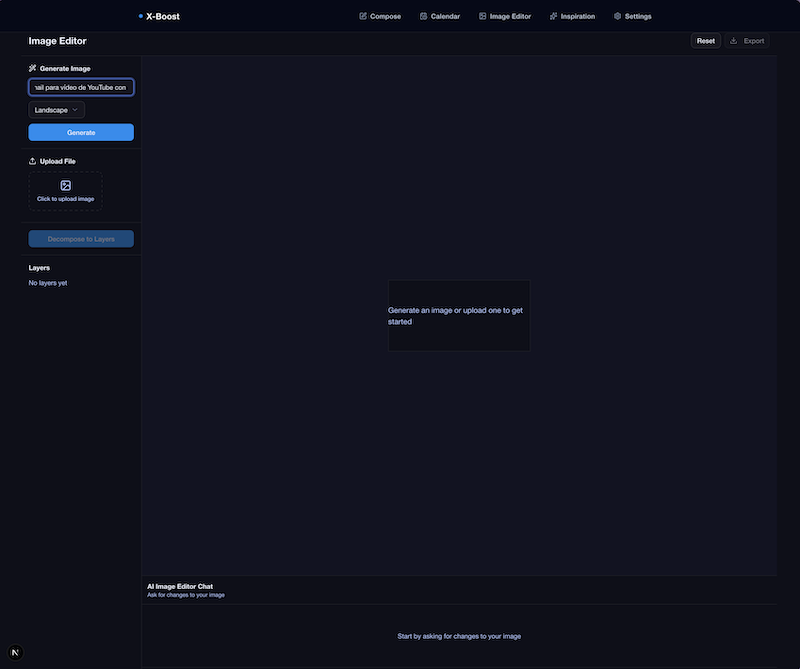
GLM-4.7 is the model I knew the least of the four. In fact, I had never used any model from the GLM family.
But people speak very highly of them, and they say this one is very close to Opus 4.5, but at a fraction of the cost.
In fact, it’s the cheapest of the four. Even cheaper than Gemini 3 Flash, which is surprising.
In this case I used OpenCode. I paid to use it through OpenRouter, and then I realized that right now it’s free in OpenCode 🤦♂️🤦♂️
In any case, the cost of the whole feature was just a bit over $1.
The questions it asked me were these:
I understand the context. Before starting, I need some clarifications:

1. fal.ai API: Do you already have an FAL_KEY configured in your .env or do we need to add it?
2. Storage of layers/editing projects: Do you want to create a new Prisma model to store image
   editing projects with their layers, or just keep everything in memory/session?
3. Page location: What route do you prefer for the image editor? For example: (dashboard)/image-editor
   or (dashboard)/editor-de-imagenes
4. Final flow after editing: What should the user be able to do with the edited image?
   Save it for use in posts, export as a file, both?
5. Image editing chat: Should the chat for requesting image changes use the same image generation
   model (Gemini) or a different one optimized for editing?
6. Layer controls: In addition to seeing the layers, what controls do you need? (visibility, reorder,
   merge, etc.)
7. File upload: Are there size or file type limits for elements uploaded from the computer?
In this case the questions weren’t bad, but some felt a bit irrelevant to me. Question 4 was especially interesting because it gave me a chance to explain that I wanted to integrate it with the composer.
The result was, by far, the worst of all. I didn’t expect this after reading that it was being compared with Opus 4.5.
- Interface: 2/5 -> A very basic UI, with barely any styling, and fairly poor usability.
- Functionality: 2/5 -> Everything was half-baked. For example, the canvas didn’t allow moving layers, and you couldn’t do much with them. And even though I asked for integration with the composer, it didn’t do it.
- Robustness: 3/5 -> It didn’t crash, there weren’t obvious failures, but almost nothing did what you would expect.
- Proactivity and Planning: 3/5 -> The questions were correct, but not especially deep.
TOTAL: 10/20
Opus 4.5
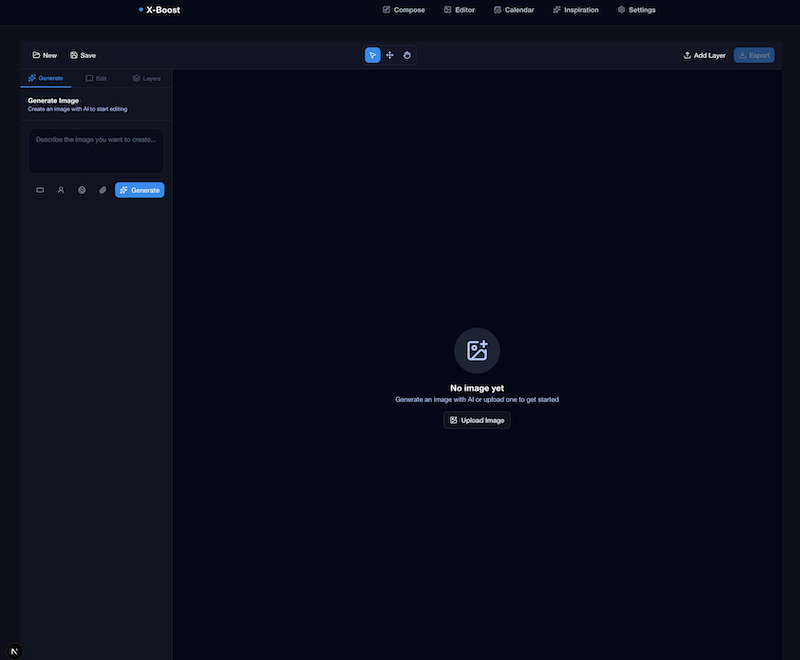
I seriously considered the cost, but in the end I decided to use Opus 4.5 through OpenCode and OpenRouter.
I never thought I’d spend more than $10 on a single prompt 😅, but I wanted to see if it really is that good.
Disclaimer here that it’s possible it works better with Claude Code.
Even so, you have to admit that, in this case, its fame is more than justified.
The questions were without a doubt the best of all the models:
Interesting feature. Before starting, I have several questions to make sure I understand the scope well:
Questions about the functionality
1. General flow
- Would the flow be: Generate image → Chat to refine → Decompose into layers → Edit layers?
- Or can the user start by uploading their own image directly?
2. Layer editor
- Once the image is decomposed into layers, what operations should the user be able to do with each layer?
  - Move/reposition?
  - Scale/rotate?
  - Change opacity?
  - Delete layers?
  - Reorder layers (z-index)?
  - Apply filters?
3. Uploaded elements
- When you say "add new elements uploaded from the computer", are these added as new independent layers over the generated image?
- Is there a size/format limit for uploaded images?
4. Chat for changes
- Should this chat be able to modify the base image (regenerate it with new prompts)?
- Or should it also be able to modify individual layers once decomposed?
- Do we use the same AI system that already exists in the project?
5. Persistence
- Do we need to save the editor projects in a database?
- Should the user be able to return to a previous project?
6. Export
- Is the final result exported as a flat (merged) image?
- Or also as a project with separate layers (like PSD)?
7. Location in the app
- Would the new page be inside the dashboard (/editor or similar)?
- Accessible from the main navigation?
8. Integration with the composer
- Can edited images be used directly in the post composer?
It asked literally everything relevant to implement it well. The result was that at the integration level, it did it the best.
- Interface: 5/5 -> Personally it was the one I liked the most. It wasn’t the flashiest, but it integrated exactly the same interface I was already using for images in the composer. It reused components and styles, so right away it included many functions others didn’t. I really liked the minimalist style.
- Functionality: 4/5 -> It tried to generate a step-by-step system that didn’t quite work well. The idea was good, but the execution not so much. The layers system was very good, but it lacked a few things I find useful, like choosing how many layers to decompose the image into.
- Robustness: 3/5 -> This is where it surprised me for the worse. Many things didn’t work as expected. The layers couldn’t be moved properly, and the option to use the image in the composer directly didn’t work. It lacked polishing in many details.
- Proactivity and Planning: 5/5 -> Without a doubt the best questions of all. It covered all the relevant points and made me think about things I hadn’t considered.
TOTAL: 17/20
Conclusions
It’s clear that the two models that are undeniably on another level for development are GPT-5.2-Codex and Opus 4.5.
Both did a very good job, but Codex’s ability to fine-tune the functionality and create an almost finished product left me impressed. That’s what I like most about this model, and here it proved it again.
Opus 4.5 did an excellent job in planning and integration with the rest of the app, but it lacked polishing in many details for the feature to be truly usable.
The other two models, Gemini 3 Flash and GLM-4.7, are much cheaper, but the results are clearly inferior. Even so, I really like Gemini 3 Flash because you can iterate very fast and its results are very good for small tasks.
What’s indisputable is that the evolution of LLMs for development this year has been spectacular.
What at the beginning of the year was a support tool, right now is capable of doing complex work almost autonomously.
I don’t know what 2026 will bring, but I’m sure it will be an exciting year.